My computer is a 2008 MacBook... and it's a ticking time bomb.
About six months after I bought this beautiful laptop, a tablespoon of water was spilt on the table next to/against the computer. I had a hard time getting the computer to wake up, but after that everything seemed fine. After a while though, the battery died. Being the procrastinator that I am, it was about six months before I took it into the Apple Store to be looked at. They replaced the battery and sent me on my way. Two months later, I had another dead battery. Apple gave me another battery and it was dead in a week. The next time I took it in, the techs took my computer apart to find out what was going on. Unfortunately for me, that little bit of water that had been spilt had started to corrode all the important parts, especially the parts that deal with the battery. Pretty much, my laptop is now a desktop because the battery can't be read. On top of that, the insides are slowly corroding away.
So for me, 'data backup day' is a weekly event. I have no idea if my computer will last another few months or another few years. According to the Apple techs, my screen will probably go first, which might be a warning sign. Or maybe it'll do like my last one did and start making crazy grinding noises first (and thank goodness for those noises which alerted me to a problem and I was able to back up my data). Either way, I plan to be prepared.
I'm backing up my data onto a set of three flash drives (two 8 gig and a 2 gig). This holds all of my genealogy research, with my gedcom saved to each one just in case one gets damaged. I also have my photos and scanned documents uploaded to my online flickr account. I'm very much considering trying out another online repository for my non-image documents.
Aside from data backup, it kills me that my laptop isn't mobile unless there's an electrical outlet nearby. I'm very much looking forward to the Atlanta Family History Expo in November, and would hate not to have full access to my computer during the events (btw, is there usually wifi at these events?). I cannot afford another computer right now, and would hate to replace this one, which works aside from battery issues. Instead, I've started considering a netbook.
If I save up a month or two I could afford a netbook. It would allow me to access the internet and basic software on the go. I am concerned about the whole Mac vs PC thing. I'm very much a Mac person, which is based on experience, not fandom. I don't have any software for PC, so I would be starting fresh there. I'm specifically worried about access to my gedcom. I use Reunion, which is only for Mac. I haven't had a lot of luck transferring sources from my Reunion created gedcom into other Mac software, so I have no idea how it will react to PC software. I'd also want to use this computer when I visit family so that I can show them my research, so it would need to hold at least part of my research.
I don't know... I'm a splurge spender and I love to buy new things. I don't want to rush to buy a computer that I don't really need. For those who have attended family history expos: did you use your computer a lot? Though I know each location is different, were there lots of places to plug them in at your event? For those that own netbooks: do they have enough power and space for part-time genealogy work? Does the compact size make them hard to use at all? Any tips on buying and using them?
I think I've gotten a little off topic from where I started. Data back-up day is important. You never know when your computer might die (but watch out for hints!), so make sure to back up your computer often. It's saved me in the past and I know it'll save me in the future.

01 July 2010


30 June 2010

28 June 2010
Amanuensis Monday - Charles Vernon's 2nd Marriage
I had no idea that my Great-Grandfather Charles 'Vernon' Albea had been married twice [see how I found out]. My mom and my aunt were equally surprised. In the end however, my Great-Aunt Ree, Vernon's daughter, did know about the marriage to, as she referred to her, "that Budell woman." Being a true southern lady, Aunt Ree didn't have much nice to say about Alice Budell Hooper, so she didn't say much at all. That's ok, because exactly one week after sending for Vernon and Alice's marriage record, I received it in the mail. Because this document is meant to be folded, the different section are placed oddly when laid flat. I'm going to transcribe the document in a way that makes sense.
No. 3343
State of South Carolina
COUNTY OF GREENVILLE
In the Probate Court
MARRIAGE LICENSE
TO
Charles Vernon Albea
AND
Alice Budell Hooper
NOTICE
The law requires that one of these Licenses be
returned by party performing the ceremony to
Guy A. Gullick, Probate Judge, within fifteen days
after the ceremony, the other to be delivered to
contracting parties.
1946
_______________________
Marriage License
I do solemnly swear that I am legally capacitated to marry; that my full name is Charles Vernon Albea; that my age is 42 years and ___ months; that my place of residence is Greenville, S.C. ; my race is white ; my nationality is American.
[Guardianship Portion of License not filled out]
I do solemnly swear that I am legally capacitated to marry; that my full name is Alice Budell Hooper; that my age is 43 years and ___ months; that my place of residence is Greenville, S.C. ; my race is white ; my nationality is American.
Whereas, It has ben made to appear to me, GUY A. GULLICK, Judge of Probate for Greenville County, upon oath that Charles Vernon Albea of Greenville, S.C. and Alice Budell Hooper of Greenville, S.C. are legally capacitated to contract matrimony, that their ages are respectively 42 years and ___ months and 43 years and ___ months, that their race is white and their nationality is American.
These are, therefore, to authorize any person qualified to perform marriage ceremonies to perform the marriage ceremony for the persons above named, and for the so doing this shall be sufficient warrant.
Given under my Hand and Seal this 15th day of Sept A.D., 1946
THIS IS TO CERTIFY THAT I, Hellen D Gullick did this day perform the marriage ceremony for the within named persons at Greenville South Carolina, this 15th day of Sept A.D., 1946
_______________________
No. 3343
State of South Carolina
COUNTY OF GREENVILLE
In the Probate Court
MARRIAGE LICENSE
TO
Charles Vernon Albea
AND
Alice Budell Hooper
NOTICE
The law requires that one of these Licenses be
returned by party performing the ceremony to
Guy A. Gullick, Probate Judge, within fifteen days
after the ceremony, the other to be delivered to
contracting parties.
1946
_______________________
Marriage License
Affidavits to Obtain License
STATE OF SOUTH CAROLINA COUNTY OF GREENVILLE | | | |
SWORN to before me this 15th day of Sept. A. D., 1946 Hellen D Gullick (L. S.) (Notary public for South Carolina) | \ | / | Charles Vernon Albea [Signature] |
[Guardianship Portion of License not filled out]
STATE OF SOUTH CAROLINA COUNTY OF GREENVILLE | | | |
SWORN to before me this 15th day of Sept. A. D., 1946 Hellen D Gullick (L. S.) (Notary public for South Carolina) | \ | / | Alice Budell Hooper [Signature] |
_______________________
Marriage License
STATE OF SOUTH CAROLINA COUNTY OF GREENVILLE |
These are, therefore, to authorize any person qualified to perform marriage ceremonies to perform the marriage ceremony for the persons above named, and for the so doing this shall be sufficient warrant.
Given under my Hand and Seal this 15th day of Sept A.D., 1946
Guy A Gullick [Signature]
Judge of Probate for Greenville County
_______________________
CERTIFICATE
THIS IS TO CERTIFY THAT I, Hellen D Gullick did this day perform the marriage ceremony for the within named persons at Greenville South Carolina, this 15th day of Sept A.D., 1946
Hellen D. Gullick
Notary Public, S. C.
(Official capacity and address)
Signature of Contracting Parties
Alice Budell Hooper
Charles Vernon Albea
[Guardianship Portion of License not filled out]
_______________________
27 June 2010
How I Use Ancestry.com's Member Trees
Often, when genealogists talk about online family trees, they do so with derision. They point out, and rightly so, that a lot of these family trees are full of miss-information that has simply been copied from somewhere else and lack sources. Many folks will simply ignore other family trees when doing their research, but I find this to be very shortsighted.
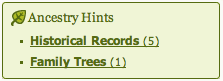 It all starts with the well advertised "shaking leaf." Although I've criticized the simplicity and, as I see it, misleading aspects, of this system, the leaves are still a good place to start. So, I click on the "Family Trees (1)" link, which will take me to my hints page. I will have to click on "Review Hints" for the families trees again to see the trees that Ancestry.com thinks match my own.
On this page, you'll see the individual from your tree on the right, with each suggested tree on the left. You can review each suggestion to decide if the individual matches your ancestor. If they do, click the checkbox next to the suggestion. This step doesn't change your tree, so don't worry about any "conflicting" highlights that you see. Once you have chosen all the suggestions that match your ancestor, click the orange button to "review selected tree hints."
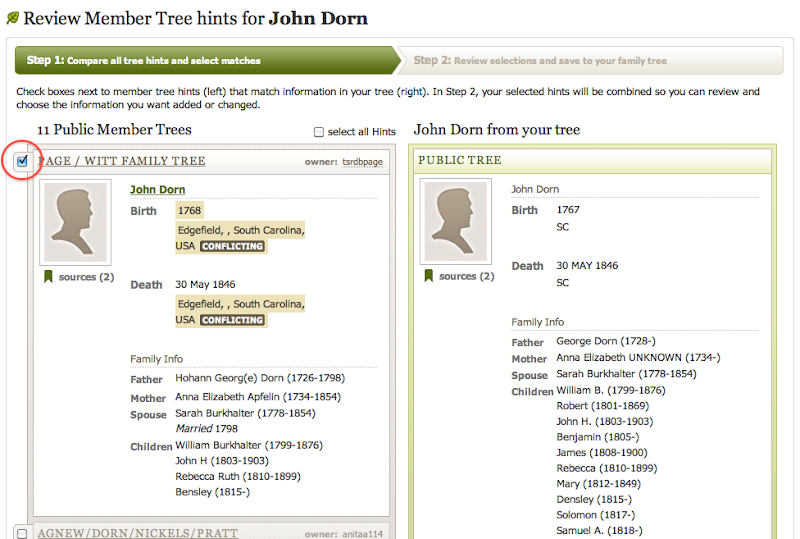
On this next page, you'll see a page where all of the information from those other trees has been combined and now wants to connect to your tree. Here's what it looks like:
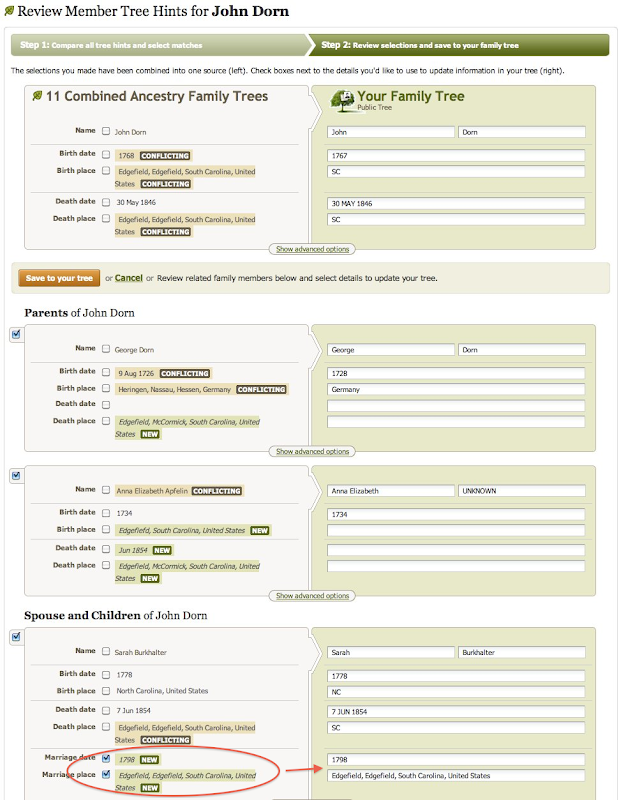
There's a lot going on in the image above. The most important think to look out for if you want to protect the information in your tree is any information marked "NEW." This only happens when the suggested tree has fields filled in that your tree has empty. This information will automatically be checked and will be added to your tree if you don't do anything. See Sarah Burkhalter for example. With these boxes check, marriage information has been inserted into my tree on the right. However, if you look above Sarah to George and Ann, you can see that I have unchecked the "NEW" information and the field on my tree remain blank. The first thing that I do when looking at this page is to uncheck all "NEW" boxes. I don't want to blindly add this information to my tree. Where did it come from? What are the sources? I have no idea. You can also see that a number of fields are marked "CONFLICTING." Because I already have information in these fields, I would have to manually mark the boxes to have this changed in my tree.
As I continue down the list of family members, I find a listing for two different Johns:
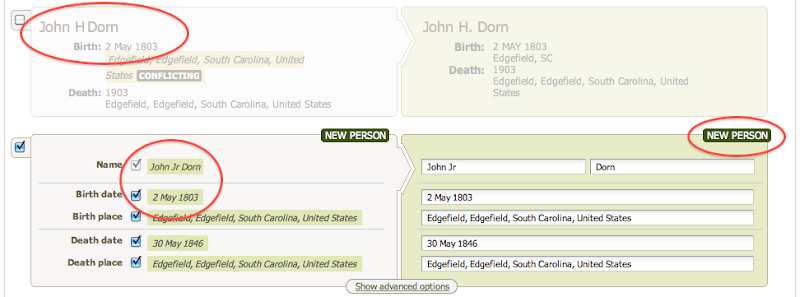
According to Ancestry.com's system, these are two different sons named John. One is already listed in my tree, while another is not and is marked "NEW." If I selected on the 2nd John's check box, he will be added to my tree as a brand new entry. But I have to be careful here, because these two John's are the same person. The have the same birthday and everything, but for some reason Ancestry wants to keep them separate. I never add new people from this view.
So if I'm not adding information from these trees, what's the point of making these connections? Like I said before, I find this system to be a good way to find new sources, document and photos for my family. After connecting these trees to my own, I have gained five new hints for my tree. All of the records on their tree, have now been suggested for my own. Perhaps they've been able to find an elusive 1850 census record that I couldn't find because of a strange spelling. Perhaps they've uploaded a document that they received from a local archive. These records will now be suggested to me - and I haven't even visited their family tree. Again, I cannot take these hints as gospel. I still need to review each hint and decide its validity on my own.
In less than five minutes, Ancestry has helped me collect the records from (in this example) 11 different family trees that reference my ancestors. Instead of having to review each tree individually, I can see their sources all at once. Of course, if these sources prove useful, I should review the tree that it came from, which might contain more information.
Genealogists should utilize all forums of research available to them. If they are cautious, there's a lot of great information to be found.
I've written before about the successes I've had with Ancestry.com's trees and finding photos. I also find that the online trees are a great way to find new sources for my ancestors. Many online trees might contain errors but might also contain links to documents on ancestry or uploaded photos and documents. By using the "shaky leaf" hints, researchers can easily add these items to their own family tree. At the same time, the prior complaints remain the same. Researchers should always use caution before adding any information to their trees, no matter how easy Ancestry.com had made it. There are ways to utilize the information and Ancestry's system without compromising the caliber of your own tree. Here's how I do it:
It all starts with the well advertised "shaking leaf." Although I've criticized the simplicity and, as I see it, misleading aspects, of this system, the leaves are still a good place to start. So, I click on the "Family Trees (1)" link, which will take me to my hints page. I will have to click on "Review Hints" for the families trees again to see the trees that Ancestry.com thinks match my own.On this page, you'll see the individual from your tree on the right, with each suggested tree on the left. You can review each suggestion to decide if the individual matches your ancestor. If they do, click the checkbox next to the suggestion. This step doesn't change your tree, so don't worry about any "conflicting" highlights that you see. Once you have chosen all the suggestions that match your ancestor, click the orange button to "review selected tree hints."
On this next page, you'll see a page where all of the information from those other trees has been combined and now wants to connect to your tree. Here's what it looks like:
There's a lot going on in the image above. The most important think to look out for if you want to protect the information in your tree is any information marked "NEW." This only happens when the suggested tree has fields filled in that your tree has empty. This information will automatically be checked and will be added to your tree if you don't do anything. See Sarah Burkhalter for example. With these boxes check, marriage information has been inserted into my tree on the right. However, if you look above Sarah to George and Ann, you can see that I have unchecked the "NEW" information and the field on my tree remain blank. The first thing that I do when looking at this page is to uncheck all "NEW" boxes. I don't want to blindly add this information to my tree. Where did it come from? What are the sources? I have no idea. You can also see that a number of fields are marked "CONFLICTING." Because I already have information in these fields, I would have to manually mark the boxes to have this changed in my tree.
As I continue down the list of family members, I find a listing for two different Johns:
According to Ancestry.com's system, these are two different sons named John. One is already listed in my tree, while another is not and is marked "NEW." If I selected on the 2nd John's check box, he will be added to my tree as a brand new entry. But I have to be careful here, because these two John's are the same person. The have the same birthday and everything, but for some reason Ancestry wants to keep them separate. I never add new people from this view.
So if I'm not adding information from these trees, what's the point of making these connections? Like I said before, I find this system to be a good way to find new sources, document and photos for my family. After connecting these trees to my own, I have gained five new hints for my tree. All of the records on their tree, have now been suggested for my own. Perhaps they've been able to find an elusive 1850 census record that I couldn't find because of a strange spelling. Perhaps they've uploaded a document that they received from a local archive. These records will now be suggested to me - and I haven't even visited their family tree. Again, I cannot take these hints as gospel. I still need to review each hint and decide its validity on my own.
In less than five minutes, Ancestry has helped me collect the records from (in this example) 11 different family trees that reference my ancestors. Instead of having to review each tree individually, I can see their sources all at once. Of course, if these sources prove useful, I should review the tree that it came from, which might contain more information.
Genealogists should utilize all forums of research available to them. If they are cautious, there's a lot of great information to be found.
Subscribe to:
Posts (Atom)
LinkWithin
