Showing posts with label Family Tree. Show all posts

10 December 2013

The Problem with Ancestry.com's "Public" Member Trees

     Over the past few weeks, I've seen an uptick in the number of emails I've received regarding DNA matches.  This is great, but it's reminded me of a problem with Ancestry.com's "Public" Member Trees: they are behind a pay-wall.

     Three of the recent emails I've received have sent me to Ancestry.com to find their trees.  None of the sent me a link to those trees, which makes the trees difficult or impossible to find.  But then, even if I do find the tree, I can't access it.  The only people who can access the "Public" trees on Ancestry.com are people with subscriptions.  Right now, that's not me.

     I then ask that the DNA match send me an invite to their tree and usually have to send them step-by-step instructions on how to do so.

     I strongly suggest that if you are doing DNA testing (with a non-Ancestry.com company) that you post your tree on your DNA profile.  So much easier for your matches to review your shared match!  If you are with Ancestry.com, please make your family tree Public.

     Now, DNA testing sites don't have the best family tree functions, so you could also upload your tree to another website.  If you aren't up for really maintaining a second tree, I recommend RootsWeb.  You can simply download a GedCom of your Ancestry.com tree and upload it to RootsWeb.  Every now and then you can update your RootsWeb tree by doing the same thing.  Then, you can send a link to your RootsWeb tree to your match.  Easy for everyone.

14 May 2013

HBO's Family Tree

     Thanks to my sister's HBO Go subscription, I was able to watch the first episode of Family Tree.  I found it to be an amusing show, though it's probably not for everyone.

     First off, it's on HBO and it's british, so there is some adult language and sexual humor (I'd rate it a strong PG13 at the very least).

     Although it's not a genealogy show, much of the show dealt with a family history theme.  The main character, Tom, is having a Sunday dinner with his family and learns that his Great-Aunt has died.  She's left him a trunk, seemingly full of junk.  When Tom starts to sort through the trunk he quickly finds an old photograph of a man in a military dress uniform.  Intrigued, he calls his father, who suggests that it is Tom's Great-Grandfather, Harry.  From there, Tom spends the rest of the show seeking help in uncovering more about the photo and his grandfather.

Tom looks for a resemblance between the man in the photo
and himself, with a glove draped on his head.
     I was a little surprised by the format of the show, and how it felt a little like an episode of Who Do You Think You Are.  It's filmed as a mockumentary with "interviews," as well as with regular sitcom style scenes (think The Office).  Tom calls relatives to ask questions about the photo, he consults experts, they meet in a cafe to discuss their discoveries.  Does this not sound like an episode of WDYTYA to you?

     There were certainly non-family-history related portions of the show, but even some of those tied into family history in off-the-wall sort of ways ("How far back do you go back? How many ancestors away do you go? Like to sort of dinosaurs times?").  Other aspects of the show were much like any other sitcom.  Since this was the first episode, much of it was taken up with introducing the characters. The show is a comedy, and it's a very British comedy. There's a lot of off-the-wall banter between very kooky characters and seemingly pointless banter.

     Overall, I enjoyed the show and will continue to watch it.  I would recommend it to others, but would understand if it's not for everyone.

07 October 2010

You're a 2nd cousin... no, it's 1st but removed.... no, ....

     Today, Ancestry.com announced a simple, but useful, addition to their Public Member Trees: a relationship calculator. Most genealogy software programs offer this, and now so does ancestry's online program. It's pretty simple to use. On each page, there is a link that reads "View relationship to me." Click the link and a box pops up, detailing the people and relationships that connect the you and the other person. The relationship information will also appear under the relative's name on the profile page.  (This is assuming that you've identified yourself in your tree already. If you haven't you can do so under the "Tree Settings" screen.)


     I think this is a great new feature, but it could be improved in two ways: 1) make this an automatic feature that can be turned on or off. As it is now, you have to click this button on every page to turn it on, and then hit another button to turn it off (though I don't know why you'd want to). This can only be done one page at a time - which just seems to be time consuming and redundant.  2) Allow for relationship calculation between two people of my choice, not automatically between myself and another person.


    Here's a screenshot of the new feature:


24 September 2010

I Want Sirius Black's Family Tree

     In Harry Potter and the Order of the Phoenix, Harry visits his godfather, Sirius Black's, ancestral home. The walls in one of the rooms are devoted to the family tree, going back hundreds of years. Although Sirius' family is full of muggle hating, You-Know-Who supporters, with all the decent people blasted off... but I'm still envious. What genealogist wouldn't love to inherit this amount of history?


     As @GravestonedPug tweeted this evening, many of us have felt the urge to cover an entire wall of our living room, office or bedroom with "Super sticky Post-its, photos, push pins, string, maps..." My dream would be to paint an entire wall with Chalkboard Paint. I'd then paint on a swirly family tree chart that I could fill in with vital stats, documents and photos. Can we say ginormous family tree? Ahhh... bliss!

27 June 2010

How I Use Ancestry.com's Member Trees

Often, when genealogists talk about online family trees, they do so with derision. They point out, and rightly so, that a lot of these family trees are full of miss-information that has simply been copied from somewhere else and lack sources. Many folks will simply ignore other family trees when doing their research, but I find this to be very shortsighted.

I've written before about the successes I've had with Ancestry.com's trees and finding photos. I also find that the online trees are a great way to find new sources for my ancestors. Many online trees might contain errors but might also contain links to documents on ancestry or uploaded photos and documents. By using the "shaky leaf" hints, researchers can easily add these items to their own family tree. At the same time, the prior complaints remain the same. Researchers should always use caution before adding any information to their trees, no matter how easy Ancestry.com had made it. There are ways to utilize the information and Ancestry's system without compromising the caliber of your own tree. Here's how I do it:
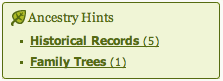
It all starts with the well advertised "shaking leaf." Although I've criticized the simplicity and, as I see it, misleading aspects, of this system, the leaves are still a good place to start. So, I click on the "Family Trees (1)" link, which will take me to my hints page. I will have to click on "Review Hints" for the families trees again to see the trees that Ancestry.com thinks match my own.

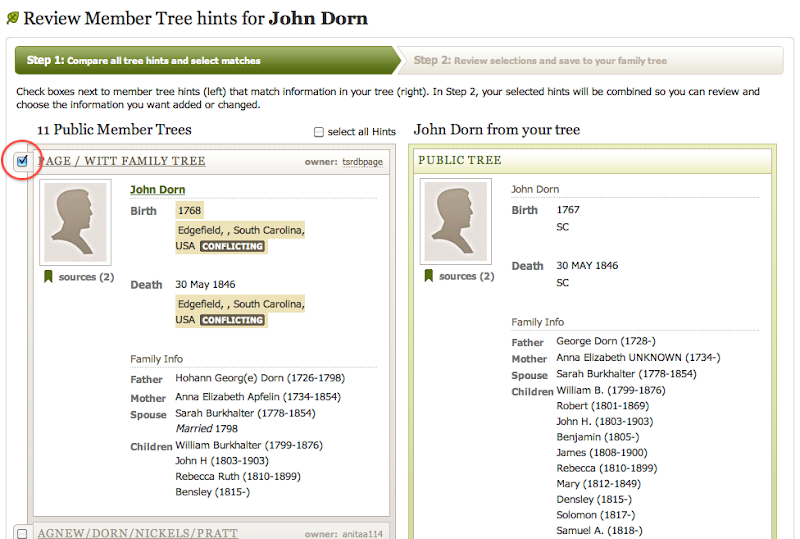
On this page, you'll see the individual from your tree on the right, with each suggested tree on the left. You can review each suggestion to decide if the individual matches your ancestor. If they do, click the checkbox next to the suggestion. This step doesn't change your tree, so don't worry about any "conflicting" highlights that you see. Once you have chosen all the suggestions that match your ancestor,  click the orange button to "review selected tree hints."


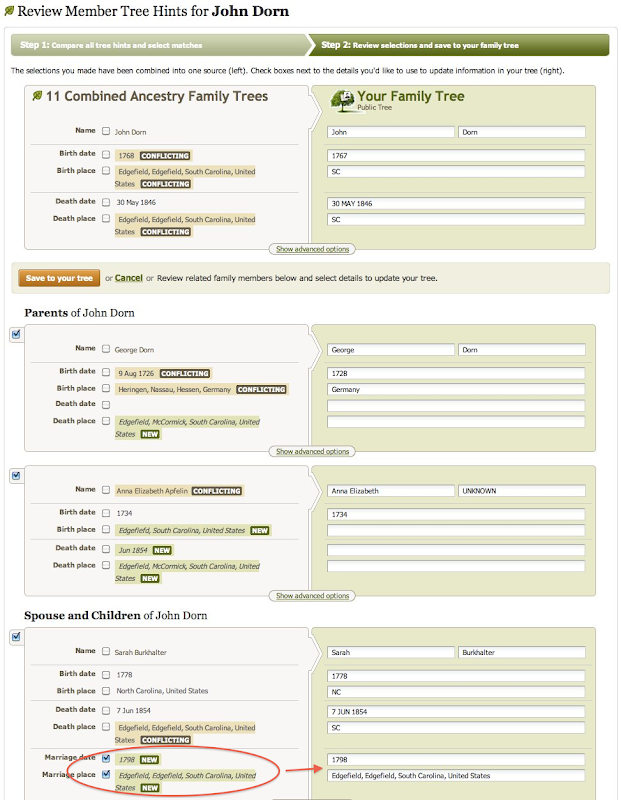
On this next page, you'll see a page where all of the information from those other trees has been combined and now wants to connect to your tree. Here's what it looks like:


There's a lot going on in the image above. The most important think to look out for if you want to protect the information in your tree is any information marked "NEW." This only happens when the suggested tree has fields filled in that your tree has empty. This information will automatically be checked and will be added to your tree if you don't do anything. See Sarah Burkhalter for example. With these boxes check, marriage information has been inserted into my tree on the right. However, if you look above Sarah to George and Ann, you can see that I have unchecked the "NEW" information and the field on my tree remain blank. The first thing that I do when looking at this page is to uncheck all "NEW" boxes. I don't want to blindly add this information to my tree. Where did it come from? What are the sources? I have no idea. You can also see that a number of fields are marked "CONFLICTING."  Because I already have information in these fields, I would have to manually mark the boxes to have this changed in my tree.

As I continue down the list of family members, I find a listing for two different Johns:
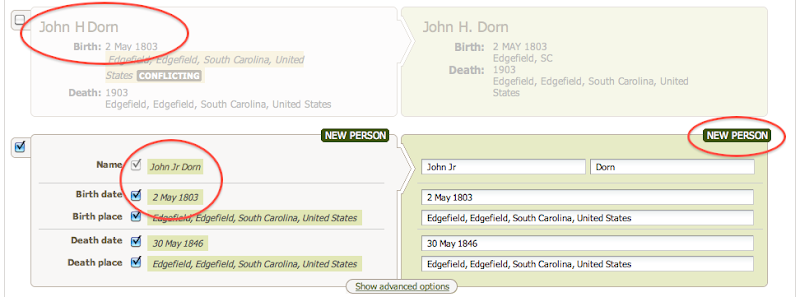


According to Ancestry.com's system, these are two different sons named John. One is already listed in my tree, while another is not and is marked "NEW." If I selected on the 2nd John's check box, he will be added to my tree as a brand new entry. But I have to be careful here, because these two John's are the same person. The have the same birthday and everything, but for some reason Ancestry wants to keep them separate. I never add new people from this view.

So if I'm not adding information from these trees, what's the point of making these connections? Like I said before, I find this system to be a good way to find new sources, document and photos for my family.  After connecting these trees to my own, I have gained five new hints for my tree. All of the records on their tree, have now been suggested for my own. Perhaps they've been able to find an elusive 1850 census record that I couldn't find because of a strange spelling. Perhaps they've uploaded a document that they received from a local archive. These records will now be suggested to me - and I haven't even visited their family tree.  Again, I cannot take these hints as gospel. I still need to review each hint and decide its validity on my own.

In less than five minutes, Ancestry has helped me collect the records from (in this example) 11 different family trees that reference my ancestors. Instead of having to review each tree individually, I can see their sources all at once. Of course, if these sources prove useful, I should review the tree that it came from, which might contain more information.

Genealogists should utilize all forums of research available to them. If they are cautious, there's a lot of great information to be found.

01 March 2010

Getting Started on Ancestry.com: A Response

Ancestry.com posted a new video on YouTube, titled "Getting Started on Ancestry.com." I found this video to be a very interesting in regards to how ancestry is advising folks to start searching their website.

The video advises a three step process for starting genealogy research at ancestry.com
  1. "Enter what you know" into a family tree
  2. "Click on leaf hints" to see what ancestry has discovered
  3. "Review the records you find"
So, Ancestry's instructions are really all about using their family trees to facilitate research. This is in no way a bad research strategy, but neither is it a complete research strategy. I believe this video represents an idealistic and simplistic version of genealogy research on Ancestry.com.

I do recognize that this is a "getting started" and very basic research strategy for novice researchers. However, I believe this presents an entirely too simplistic view of genealogy research. It makes it seem as if no hard work is needed to create a family tree. Although the video points out the "search records" feature in the family tree, the video implies that most of the research will be done automatically by Ancestry's family trees. The video never shows a screenshot of the actual search form - old or new. Perhaps that's intentional? A newbie viewing the new search form might be overwhelmed. Such a screenshot might completely negate the simplistic tone of the video.

I also find it interesting that Ancestry.com is pushing their family tree feature so much, while self professed longtime, "real" users thoroughly dislike and disparage these same trees. I've seen countless comments on Ancestry.com's blog and message boards in which such researchers complain that the family trees are nothing but trash. Personally, I disagree with this blanket statement, though I believe it does have merit. There are a great many trees on Ancestry that are nothing but copy/paste clones that contain impossible lineages. Many novice researchers may not be aware of this, nor of good research practices. I worry that these new researchers will accept other family trees at face value, viewing all trees as "true."

So, although I know that this video is a very simplistic advice for getting started on Ancestry.com, I feel that it presents an overly simplified view of research on the site. This view may lead to the spread of misinformation and bad research habits. I hope that Ancestry.com follows up this video with more indepth information on how to use their site. Some ideas include, adding a link at the end of the video to their many free webinars, creating a short video that sums up some basic search techniques, a video about documenting sources or about cross-referencing difference sources. There's a lot that Ancestry.com could do to follow up this video, but I hope that whatever they come up with isn't as simplistic as this video.

14 October 2009

Craft family DNA

Some time ago, I had my dad take a 64 marker Y-chrom DNA test through Family Tree DNA. His results came back as haplogroup G. Once I had his results, I joined them to the 'Craft Surname Project' on the Family Tree DNA website.

There are a number of participants in the group, with 25 DNA listings and 19 family trees. At this time, there are two group members with 12 marker tests who match my dad's DNA. However, they have not responded to emails.

So, if there is anyone who descends from Craft family lines in the Elbert, Hart, Lincoln, and Morgan Counties of GA, or near Anderson County, SC, who is thinking about testing their Y-DNA, I encourage you to do so. I'd love to have someone to compare my Dad's DNA to.

Here's a chart of a few of my Craft generations: (click on the image to see the whole thing)


willis craft family tree

29 May 2009

Sharing Family Photos

I like to post all of my family photos to my Flickr account. My hope is that relatives will see the photos and leave a note with information or identify individuals. This has happened, but not often.

But I've noticed something lately: folks are finding the photos and taking them to add to their own online family trees. I've found my photos (and yes, they are my edited scans) being used online on trees, like those hosted at Ancestry.com. And let me say: this is fine - it's why I put them out there. I want to share my photos with other family members.

Sally Ruth Evans Craft and her children But, I'm missing out on another goal: connecting, communicating and sharing information. For example, I recently checkout out my "shaky leaves" for my Craft family line at ancestry.com and found a few exact matching trees. From there, I once again saw some of my scanned photos (shown). I only knew the identity of three of the folks in this photo, but the person who'd added it to their tree had identified everyone!

Sarah Britt Craft & Frances Craft AdamsI was very excited to be able to identify these relatives, but at the same time it's a little frustrating. I'm sharing my information and would hope that other researchers would reciprocate by sharing their information - not just take mine and run.

Also, there is no information on where the photo came from, or "credit" given. Personally, for my research, I want to be able to talk to the person who owns the original before I take the photo for fact.

I hope that in the future, researchers will consider an information exchange in such situations, and not just take and run.

LinkWithin

Related Posts with Thumbnails