Showing posts with label software. Show all posts

08 December 2012

Exploring Heredis for Mac

     As a Mac user, genealogy software programs were once very limited. Back when I got started there were few options and one real standout company: Reunion. Over the last few years however, more companies have introduced Mac versions, but I haven't found any product that would tempt me away from Reunion.  I was recently invited to explore Heredis for Mac and have found a product that really stands up to the competition.

     Heredis is a French based software company and there is certainly a European feeling to it.  For example, the default for the dates are dd.mm.yyy instead of the more American mm.dd.yyyy (though in most cases you can change this to the more standard genealogical dd mmm yyyy).  And if you don't specify that Georgia is a state in the US, the map will pick the country by default.  It's something to get used to, but soon becomes just a little quirk.

     Here's a basic screenshot of the "Immediate Family" pages for Bennie Craft, my Great-Grandfather:


     You can see that there are a lot of features here.

     On the left you can view a list of People, Places, Sources and Media in your tree. Each list is searchable or sortable, like People. You can search by name or by criteria such as education, religion, childless families, etc.  Places can be sorted to show only places that apply to the person you're viewing.  Clicking on a Place shows you a map of that place, and you can also see a list of people associated with that place.  I really like all the things you can do with Places, so I'll share a few screenshots.


     The middle section of the screen details the individual you're looking at. There are multiple view that you can navigate to, including the Immediate Family tab shown above, that summarizes the data in your tree for one person. The Personal Data tab allows you to edit the information and view details, the Family Group Data allows you to edit the children and parents, and the Ancestors tab, which is a cascading pedigree chart. Each section is pretty much self explanatory and very user friendly. I'm not accustomed to being able to edit someone while viewing a different person (ie I can edit Bennie's son, Thomas, while viewing Bennie's Family Group Data tab) and can see where this function would be beneficial.


  The right side of the screen is Navigation and other data.  The top right is a navigational feature to help you move through your tree. It took a minute to get used to, but once I did I really liked it. You have to make sure that you have your home person set properly, and these buttons will navigate through their direct line. There's also a list of Relatives, and a Summary of people and events connected to the person you're viewing.   The Bookmarks feature is located in this panel and is helpful as well. I usually have a few ancestors that are central to my research for a variety of reasons. I can add them to the bookmarks menu for easy navigation.

     So those are the features that pertain to data entry and storage. But once you input your data, there are also a number of features that allow you to present the information in charts, reports and book formats.

     The Book feature is very nice, but also a bit limited. There are a lot of different settings that allow you to include or exclude different data sets, but you are pretty much set in the template. You can create ancestor books or descendant books an then further edit them in your own word processing software. Depending on how much you like the template used to create the book, you might do very little editing, or you might do a lot. Expect to play with this feature a few times to really understand what your book will look like. But once you get your settings right, you will have a nice booklet that you can print out an share with family, or even work toward publishing (though for that you'll really want to personalize it).

     The Reports (or Sheets as they are called), are much like any other software program, with person and family group sheets. Each one can be created in a small variety of professional looking templates, which can be personalized.

     One of the most impressive features is the Charts feature.  You can create very nice looking Ancestor, Descendant and Hourglass charts.  Many of them have themes beyond just different color boxes. For example:

 <--->

     Also impressive are the Designed Charts, which put your family tree into graphics that you probably wouldn't mind framing. There aren't as many formatting options here, probably due to the restraints of the templates.


     Overall, I really like Heredis. There is a bit of a learning curve, but for the most part my Gedcom imported easily, with sources being the only data that did not import properly (I never can seem to import them properly into any software).  Even my photos imported once I told them where one was located. The European dates get me, and I'd love to be able to reformat all the dates that display in the software.  Another thing I find a little strange is the way places are presented. For example: Elberton (Elbert County, Georgia, United States). There seems to be an emphasis on the city, with county, state and country presented as an afterthought. Perhaps this is a European thing? Finally, Heredis does not automatically save changes. Every so often a window will pop up asking if you want to save your changes. I'm used to software the automatically saves, so this is annoying to me.

     Heredis also works with mobile versions for iPhone, which I have not yet tried.

     If you are in the market for new genealogy software, I would certainly give Heredis a try. You can download a free trail version on their website and decide for yourself.

Note: I was offered a free copy of Heredis for review

27 November 2012

VHS Conversion Success!

     In my last post, I wrote about becoming inspired over Thanksgiving to convert our family's old VHS home movies to digital format.  I had ordered some software and was waiting for it to arrive.  Well, it did arrive and I did convert one of those VHS tapes!

     I had ordered a software and cable combo from Roxio called Easy VHS to DVD for Mac.  I'd done some research and read numerous reviews before making this purchase.  There are a number of options out there, and this is one of the best reviewed for Mac.  And as the title suggests, it was relatively easy to use.

     I installed the software in seconds, but ran into a little trouble when connecting the cables.  I plugged the cables that came with the software into the audio cables that I normally use to connect my DVD player to my TV. I then connected one end of the cables to my computer and the other end to my VHS/TV combo. Nothing happened. I then went to use my parents stand alone VHS/DVD player and plugged the audio cables into the front plugs. Nothing happened. My mom then suggested unplugging the VHS/DVD player from the TV and plugging my cables into the connections in the back. Success!

     Once the cables were hooked up correctly, I was able to see and hear the VHS tape on my laptop as it played in the VCR.  All I had to do was hit "record" in the software and "stop" when the tape was over. Easy! The software then saved a copy and sent another copy directly to iMovie.  The quality of the resulting digital copy is good, but not great. The images are sometimes jumpy during fast movement, but I'm pretty happy with the results, especially considering how easy it was to create.

     This home movie focuses on me, my sister and two cousins playing on a swing set, a sand box, with some pets and then ultimately catching lightning bugs.  There's a lot of random stuff in here and a lot of unintelligible 6 and 4 year old chatter. I decided to save an original raw copy and then created an edited version with "the good stuff." I then uploaded a medium quality copy to YouTube and will be making copies on DVD for the family.

     Here's the final video, hope you enjoy:

25 November 2012

Thanksgiving Inspiration

     For Thanksgiving my mom and I visited with my Aunt June (Albea) and cousin, Miranda. After dinner we watched some old home movies that my cousin had brought over. A little backstory: when we were kids my aunt had a camcorder; one of those big ones that recorded directly to VHS and you carried around on your shoulder. We often had sleepovers with our cousins and our aunt would record our antics.

      These movies hold an almost reverent position in our childhood memories. For example, when someone mentions the "Lightning Bug Video" you almost go ahead and start laughing at the thought of just watching the crazy stuff we got up to while trying to catch lightning bugs.  We all swear that if we sent this video to America's Funniest Home Videos, we'd win $10,000 easy.

     But this movie and others are trapped on VHS. I still have a VHS player, but many people don't.  Give it another few years and I might not have one either. I need to get these videos digitized so that they can be watched in the future (and preserved in multiple copies).

     I had tried simply playing the movies on the TV and recording them with a camera but, aside from being a last resort, this simply isn't good enough. So I did some searching and found some software from Roxio called Easy VHS to DVD for Mac. I ordered it from Amazon for $52.99.  In a day or two I should have the software and cables and hopefully can start transferring the old home movies to digital format.

     I'll give an update on my progress then, but until I can get started I'll leave you with a 15 second clip from the "Lightning Bug Video" that I recorded on my phone.


05 November 2011

Frustrations with Technology

My sister at our Mac Performa 450
     As a lifelong Mac user, I'm accustomed to software inequality. Small print reading "For Windows Only" and "Not Available for Macintosh" has been a common sight. Over the years however, as Apple computers have become more mainstream, things have vastly improved. Now most major software is available to me and my Mac. However, there are still areas of weakness, especially for niche markets such as genealogy.

     When I got started in genealogy, about nine years ago, it was difficult to find a software program for my family tree. I'd created my tree online at ancestry.com, but their software was for windows only. Many other mainstream genealogy software was as well. I finally found Reunion, a Mac specific program, which I love. Since then, more Mac software has been developed and Ancestry has come out with a Mac version. However, their Mac software is a version behind their windows software. Other companies, such as RootsMagic and Family Tree Builder have not developed a Mac version (and to be fair, Reunion does not run on Windows). Even outside of family tree software, Mac computers aren't given equal consideration. Want to transcribe records for Ancestry.com's World Archives Project? Better be running a Windows computer.

     Ironically, with the growth of smart phones and tablet computers, Apple has become king. Most phone and tablet apps are available first and/or only for apple devices and often only later become available for Android. I don't personally have either device, but I do have access to Android phones. Multiple times I found a neat new genealogy site online that has a phone app to go with it - but only for Apple. For example, Blurb.com has a new eBook feature, but it currently only works on iphones and ipads. And Ancestry.com came out with an iPhone app back in January, but only this week started beta testing their Android version.

     I wish that software and website developers valued their customers equally. I'd love to use their software, maybe give them my money, but I don't often have the opportunity to do so.

22 October 2010

Where's My Brother?

     Tamura Jones has a great article about genealogy software and the way they present, or should I say fail to present, families. Everyone, especially software makers, should read this article and evaluate their own genealogy software. As stated in the article, "The problem with genealogy software based on the traditional nuclear family is not just that it fails to support other families, but also that it force-fits everything and everyone into its limited model of the world."


     Just about every genealogist has experienced this in their research, even if they haven't put it into so many words. Everyone has someone in their tree that has re-married with children involved, or never married but had children, or perhaps is in a same-sex relationship. How are these relationships presented in genealogy software? Usually in an incomplete way.


     When I look at myself in my genealogy software, Reunion, I often have one sibling: my sister. The problem is that I have a brother, Allen, as well. Technically, he's my half-brother, but I never use the word "half" unless I'm explaining to someone why we have different last names. In Reunion however, I often don't have a brother at all, when viewing my own information. And when I look at my brother in the program, my sister and I often don't exist. To explore this problem, I thought I'd evaluate the different views and reports in Reunion to see how far a simple, and extremely common, family situation like this is not accurately represented.


     In reunion, the default view is the family card. In this view, we are concentrating on a couple, as well as one generation above and below them. In this situation that would be my mom and dad. Above them, you can see four buttons, one for each of their parents. Below the couple you see buttons for their children. In this case, you see my sister and I, but you don't see my brother, because he is not a child of the exact same parents as I am. In order to see my brother, I need to navigate to the family card that shows my mom and her first husband.  I can do this easily, by utilizing the red arrows next to my mom's name. But again, this will be an incomplete view that won't show me or my sister. Nor does it show Allen's other half siblings from his father's second marriage.


     So, looking at the available reports, where can I see myself as well as my brother? I created the available reports in Reunion. When looking at each report, I created it in the best way to possibly display my full family.
  • Family Card for My Parents: No
  • Pedigree Chart for Myself (with siblings): No 
  • Relative Chart for Myself (with siblings): No
  • Relative Chart for My Mom (with siblings): Yes
  • Descendent Chart for My Parents: No
  • Person Sheet for My Mom: Yes
  • Family Group Sheets for My Parents: No
  • Register Report for My Mom: Yes
  • Family History Report for My Parents: No
  • Descendent Report for My Parents: No
     So, three reports and views in which my brother and I appear together and six in which we don't. One of the main problems with viewing myself and my brother in the same report is that many of the reports focus on my parents as a couple. With reports such as the Descendent Chart and Family Group Sheets, my parents are locked together.  In reports where my mom appears as an independent person, my brother and I both appear together. 


    Why can't I look at just the descendants of one person? It just doesn't make any sense! Many times in my family I have a person who married multiple times and had children with multiple spouses. I should be able to see all of the children at once. 


     I would love to see genealogy programs expand their report functions to better display these complete families.

18 May 2010

How to Change Assigned Parents in Reunion

For me, a big part of genealogy research is finding false leads and having to correct data. This is especially annoying when that data has already been entered into my gedcom file. Here's a quick example on how to fix one of those errors using Reunion software for mac.

I'm currently breaking down my Albea family brick wall. It's a bit confusing right now, with the discovery that my ancestor, Thomas Albea, had two wives. So, I need to move some of the children around between spouses.  Using Reunion, I can do that rather easily - but it took me a while to figure this out so I thought I'd share it.

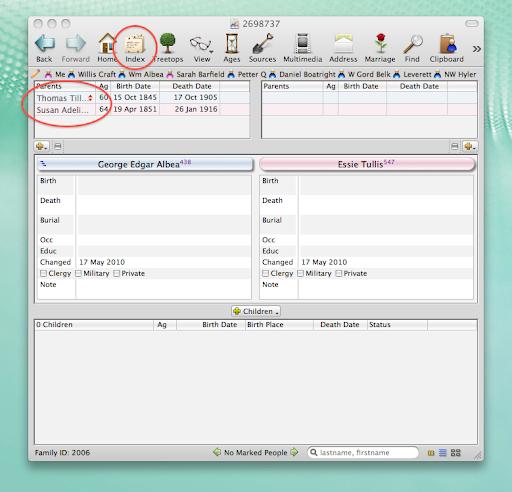
Here's what my initial family looked like:


You can see that I have George Albea listed as the son of Thomas and Susan Albea. In fact, I believe him to be the son of Thomas and Sarah Albea. Because I already have George listed with his wife and have begun to add sources, I'd rather not have to delete the couple and start over. It's much simpler to change George's mother.  

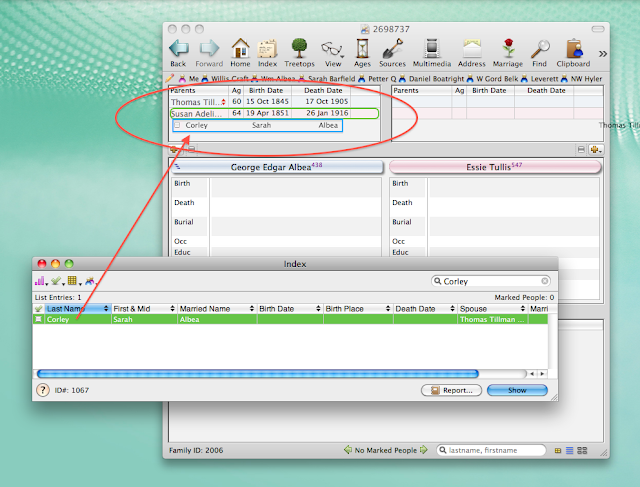
To start with, I select the Index icon on the toolbar (I've arranged this icon to appear in this exact spot, so it may be in a different place on the toolbar for other Reunion users). When the Index box pops up, I typed in the surname for George's correct mother, which is Corley. In this case, Sarah Corley is the only result. Now, I simply click on Sarah's name and drag and release it over Susan's name, as shown below:


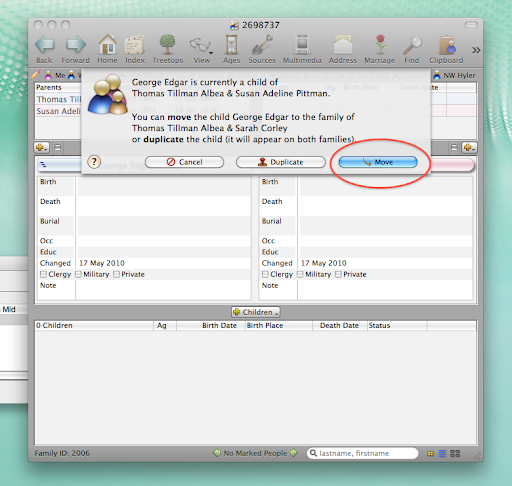
Now, my software will ask me to verify how exactly I'd like to add Sarah to George's record. In this case, I want to move George to the record for Thomas and Sarah. This way, I don't end up with mulitple listings for George or random, unattached individuals floating in my software. If I was unsure which woman was George's mother, I could duplicate George and have him appear as a child for both of Thomas' wives.


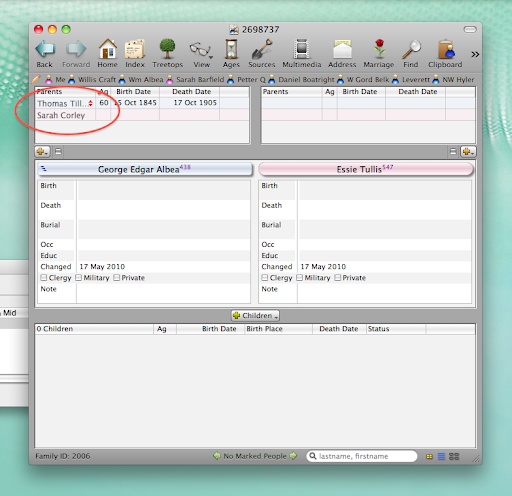
Now, you can see that George's parents are listed as Thomas and Sarah:


This method can be used for a number of other events in Reunion, such as adding a second marriage between duplicate spouses or creating links between two ancestors already listed in your tree.

13 July 2009

I use Reunion

I use Reunion - and I really do love the program. As a Mac user, choices in genealogy software are more limited than those using Windows. This was especially true a few years ago when I first went looking for software. At the time, I choose Reunion and, at $99, it was actually a Christmas present that I could not afford on my own! I've been happy with the program and the consistent updates and upgrades that have been offered. I'm currently running Reunion 9.09.

Here's a view of the program:


There's a lot that's customizable about this program. For example, the screenshot above can be completely customized. I can change the colors, the sizes of each section, which fields I want to display, date formats, how children and parents are listed (list/buttons), and more.

There are also a lot of great features available.

I can create all sorts of reports and charts, which can then be customized. I can add photos, re-arrange the direction of the chart and how the lines flow. It took a bit of exploration, but now I can create a descendent, pedigree, fan, timeline, or relative chart and customize it with ease. Here's a simple one that I did, that looks nothing like it did when I started (click to see larger):


Another feature I like is the "Ages" button. With one click I can see how old a person was when a life event occurred. In the example below, I can see that Leverett was 18 when he married, 21 at the age of his first child, 46 when his mother died, and 68 when his wife died. This feature has been a quick check for finding how information at a glance. For example, I can click and see that my parents have been married for 30 years and 266 days as of today. You can also add historic events into the timeline, such as Presidents and Olympic events.


Another great feature is the ability to create web pages. This feature has given me a little frustration - but that's because I wasn't using it right. Now, I can easily maintain and update my own family website. See it here.

Other great features include an easy to use index, photo and media attachment to individuals and sources, book-style reports, birthday reminders, address books, speed names, and a good help manual. I also recommend checking out the community at the leisterpro website, where other uses have posted great tips and tricks.

Overall, I really do recommend Reunion to Mac users and, personally, prefer it over MacFamilyTree.

27 June 2007

I upgraded my Reunion software to version 9. It's prettier and has new features (some of which I'll probably never use). I'll need to play with it some, but I hope I get my money's work ($60!).

Otherwise running around all over the family tree looking here and there and not finding much. Added a little info to the Farr family, which is my sister's husband's family. Most of this family has already been researched by others.

LinkWithin

Related Posts with Thumbnails