Showing posts with label reunion. Show all posts

11 February 2013

Unexpected Side Effects

     Last week my cousin Anne sent out an email regarding an upcoming Barfield Family Reunion.  Our last/first reunion was held back in the fall of 2011 and this upcoming one had been loosely scheduled for this spring or early summer.  I suggested that we start a private Facebook group to help organize the reunion, which Anne thought was a good idea. Turns out it's been a great idea - and not just for reunion planning!

     I created the group, Barfield Family Reunion, and invited a few family members who I was already friends with on Facebook.  I knew that there were more relatives on Facebook, so I encouraged everyone to invite any other relatives that they were friends with on the site.  I originally invited 8 people to the group. There are now 44 members!

     One of the first things I did when I created the group was to add a photo of the last reunion.  From there, others started adding old photos of our ancestors and their descendants.  Some of these photos have already made the rounds to some of us via email, but now everyone will have a chance to see them.  There are also a number of photos that I haven't seen before that I've been able to add to my collection.

     Although we haven't quite used the group to finalize any reunion plans, it has given people a chance to get in touch with other family members, many that they haven't seen in years.  I anticipate that the group will eventually help us with reunion planning, but until then it's been beneficial in other ways.

18 May 2010

How to Change Assigned Parents in Reunion

For me, a big part of genealogy research is finding false leads and having to correct data. This is especially annoying when that data has already been entered into my gedcom file. Here's a quick example on how to fix one of those errors using Reunion software for mac.

I'm currently breaking down my Albea family brick wall. It's a bit confusing right now, with the discovery that my ancestor, Thomas Albea, had two wives. So, I need to move some of the children around between spouses.  Using Reunion, I can do that rather easily - but it took me a while to figure this out so I thought I'd share it.

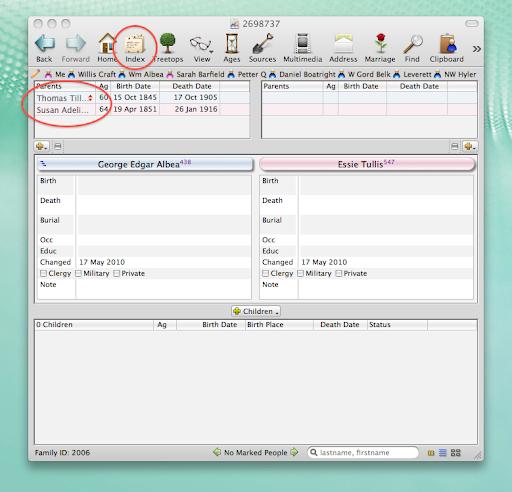
Here's what my initial family looked like:


You can see that I have George Albea listed as the son of Thomas and Susan Albea. In fact, I believe him to be the son of Thomas and Sarah Albea. Because I already have George listed with his wife and have begun to add sources, I'd rather not have to delete the couple and start over. It's much simpler to change George's mother.  

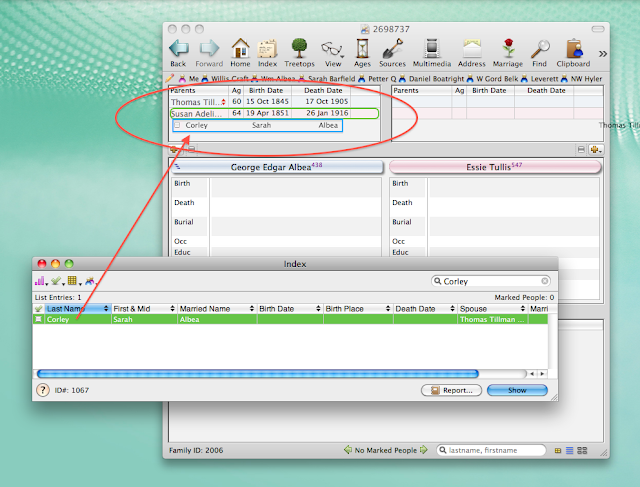
To start with, I select the Index icon on the toolbar (I've arranged this icon to appear in this exact spot, so it may be in a different place on the toolbar for other Reunion users). When the Index box pops up, I typed in the surname for George's correct mother, which is Corley. In this case, Sarah Corley is the only result. Now, I simply click on Sarah's name and drag and release it over Susan's name, as shown below:


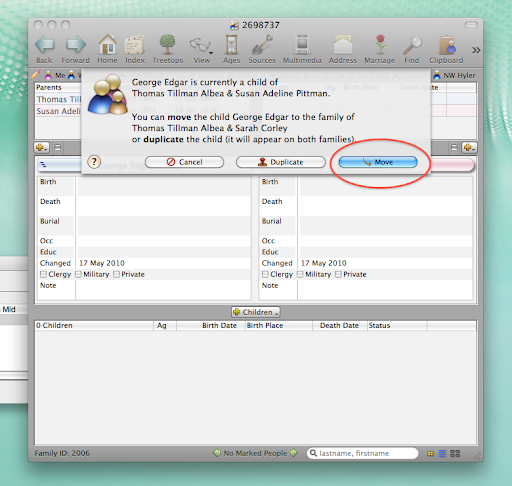
Now, my software will ask me to verify how exactly I'd like to add Sarah to George's record. In this case, I want to move George to the record for Thomas and Sarah. This way, I don't end up with mulitple listings for George or random, unattached individuals floating in my software. If I was unsure which woman was George's mother, I could duplicate George and have him appear as a child for both of Thomas' wives.


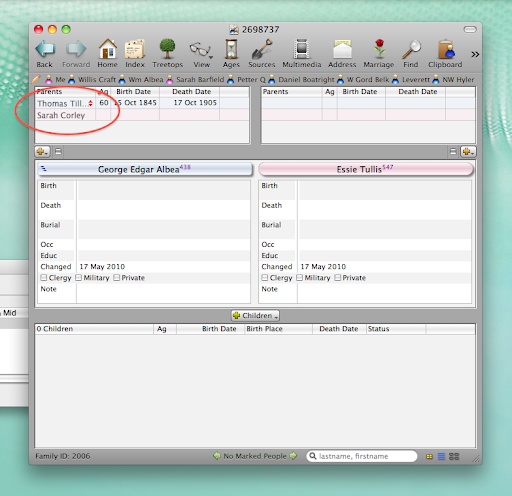
Now, you can see that George's parents are listed as Thomas and Sarah:


This method can be used for a number of other events in Reunion, such as adding a second marriage between duplicate spouses or creating links between two ancestors already listed in your tree.

17 April 2010

SNGF - Timeline Charts

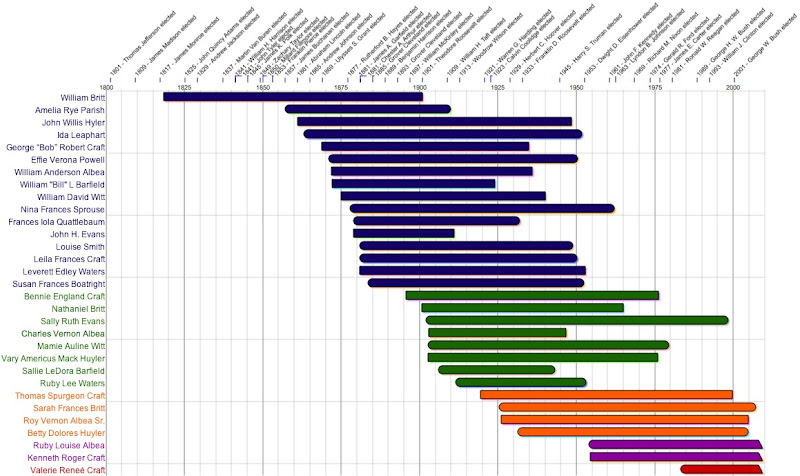
This week's Saturday Night Genealogy Fun "mission" is to create a timeline chart using our genealogy software.

Personally, I really enjoy the weeks when the ideas force us to explore our genealogy software. I've looked at the timeline chart function in my software program (Reunion) before, but never spent any time figuring out how to really do anything with it. So, I decided to explore my software's timeline functionality and make a five generation timeline chart.

It's an easy process. First, mark everyone that you want to show up in your chart. This just means that you click a little box on each person's page. Next, go to "Create" on the file menu and select "Timeline Chart." Everyone is automatically sorted by birth, but you can sort by death, age, etc. I very easily changed the colors of each person to match others in their generation. Next, I added "Perspective Events" that I had previously loaded into the software (see how to do that here). In this case, I chose US Presidents. I expanded the chart a bit and moved some of the presidents over a tad to make them all fit. To save this chart, simply "Save As," just as with most any other document.

I ended up with a chart that very nicely shows five generations of my family. You can see that the first person, William Britt, was considerably older than others of that generation. Otherwise everyone else just sorta flows, with small gaps to indicate generational changes.

13 July 2009

I use Reunion

I use Reunion - and I really do love the program. As a Mac user, choices in genealogy software are more limited than those using Windows. This was especially true a few years ago when I first went looking for software. At the time, I choose Reunion and, at $99, it was actually a Christmas present that I could not afford on my own! I've been happy with the program and the consistent updates and upgrades that have been offered. I'm currently running Reunion 9.09.

Here's a view of the program:


There's a lot that's customizable about this program. For example, the screenshot above can be completely customized. I can change the colors, the sizes of each section, which fields I want to display, date formats, how children and parents are listed (list/buttons), and more.

There are also a lot of great features available.

I can create all sorts of reports and charts, which can then be customized. I can add photos, re-arrange the direction of the chart and how the lines flow. It took a bit of exploration, but now I can create a descendent, pedigree, fan, timeline, or relative chart and customize it with ease. Here's a simple one that I did, that looks nothing like it did when I started (click to see larger):


Another feature I like is the "Ages" button. With one click I can see how old a person was when a life event occurred. In the example below, I can see that Leverett was 18 when he married, 21 at the age of his first child, 46 when his mother died, and 68 when his wife died. This feature has been a quick check for finding how information at a glance. For example, I can click and see that my parents have been married for 30 years and 266 days as of today. You can also add historic events into the timeline, such as Presidents and Olympic events.


Another great feature is the ability to create web pages. This feature has given me a little frustration - but that's because I wasn't using it right. Now, I can easily maintain and update my own family website. See it here.

Other great features include an easy to use index, photo and media attachment to individuals and sources, book-style reports, birthday reminders, address books, speed names, and a good help manual. I also recommend checking out the community at the leisterpro website, where other uses have posted great tips and tricks.

Overall, I really do recommend Reunion to Mac users and, personally, prefer it over MacFamilyTree.

27 June 2007

I upgraded my Reunion software to version 9. It's prettier and has new features (some of which I'll probably never use). I'll need to play with it some, but I hope I get my money's work ($60!).

Otherwise running around all over the family tree looking here and there and not finding much. Added a little info to the Farr family, which is my sister's husband's family. Most of this family has already been researched by others.

LinkWithin

Related Posts with Thumbnails