Showing posts with label tips. Show all posts

08 August 2012

Why Should I Care About Great-Great Grandmother's Siblings?

     I was reading comments on Ancestry.com's blog the other day and a particular of a comment caught my attention.  I'm not trying to call someone out, but to point out an error that others might be making in their research. This comment wasn't directed at me, but was posted on a public blog, so I will re-post part of it here.
"Had spelled the name correctly three years ago, but never got a leaf for her to guide me further. Revisited that profile page again last week! Since I knew her brother lived with her in the 1900 Census, I decided to give him a separate profile page of his own (even though I am not really interested in him, since I only deal with direct blood lines). No sooner than that I had done this that I had a “leaf” on his profile page that led me to two ancestry trees that had HIS SISTER (the ancestor of interest) and her ancestry in it..."
     Do you see the problem here? The researcher was completely ignoring collateral line ancestors. Since they weren't her direct ancestor, she thought they didn't matter. But the minute she added them to her family tree on Ancestry, she got hints that lead her to other family trees for her ancestor.

     I often offer to do family trees for friends and co-workers, since I enjoy the challenge. I always ask them to give me information on someone who was alive in 1930 (now 1940!), including any information on their dates, locations, parents, and siblings. I need enough information to distinguish one Lucy Miller, born 1915, wife of William, with daughter Margaret, from another Lucile Miller, born 1916, wife of Bill, with son Edward. If my friend is the descendant of son, Robert, who was born in 1941 and not yet in the census, I'm at a loss. But if I know that they had a daughter named Margaret, I can pick between the two options (and look for further evidence). If I didn't know about Margaret, I wouldn't know which family was the right one.

     It's extremely important to research the siblings of your direct ancestors, especially if you're stuck. If you have a "brick wall ancestor" and you haven't tried researching their siblings, you might be overlooking an obvious answer. For example: if my ancestor's death certificate lists her parents as John Smith and Mary Smith, I want to look for the other children of John and Mary to find her maiden name. One of their death certificates might tell me that Mary's maiden name was Quisenberry. Hello! Also, think about an obituary of a sibling that might list the parents, or a society piece in the newspaper that mentions a family visit. Any record that ties your direct ancestor to their parents likely exists for the siblings. If your ancestor's document is faulty, the siblings' document is like a second chance.

     You can't stick to your direct blood line relatives if you want your family tree to grow. It's that simple.

11 June 2012

Research Strategy: Tabbed Browsing

     When I'm doing genealogy research online, I often find that when I come across unexpected finds, I'm easily distracted from what I set out to do. Sometimes when I follow the new research I can loose track of where I originally meant to go.  To help me get back on track I utilize tabbed browsing in my research.

     What do I mean by tabbed browsing? It is having multiple web pages open in one browser window. It means that almost every time I click on a link on a genealogy site, I open that page in a new tab in my browser window. Here's a screenshot of this morning's research:


     You can see that I have two different browser windows open, each of them with multiple tabs. Each tab is a different step in this morning's research.

  • I started off looking at Agriculture census records for my ancestor, James Shiflet. Two tabs: the Agriculture search results and 1860 Agricultural census page.
  • I realized that I had not saved a copy of his 1950 and 1960 census records to my computer. Three new tabs: the Population Census search results and 1950 and 1960 census page.
  • The Ancestry.com Georgia Census images for 1950 are terrible. I opened a new browser window and went to FamilySearch.org. Two tabs: a General Search for James Shiflet and the 1950 census page.
  • I got distracted by another results from the general search and opened one additional tab: James' daughter's death certificate.
     At this point I have all of my research laid out in front of me. I never have to use my back button. I never have to re-key my search forms. I never have to re-load images. I never forget what I was originally searching for.

     To open my new tabs I simply hold down the command key (⌘) and click on the link.  On a windows computer this would be the control key or you can right click on the link and select "new tab" from the menu.

21 November 2011

Death Certificates: The Good, The Bad, and The Ugly

     A death certificate is a valuable record for genealogists. For the most part, they can be easy and inexpensive to obtain and provide a ton of information. A death certificate for your brick wall ancestor is the answer to your genealogy prayers - right? Not so fast! Just like any other record, you need to obtain it, evaluate it, and decide how trustworthy the information is.

     Imagine this scenario: your loved one has just passed away and you're grieving, but also having to handle the legal issues created by death. The funeral director approaches you and asks for the names of the parents. You know this information, but your mind goes blank. Seeing that you're upset, the funeral director tells you that it's not important and that they have enough information from other relatives/documents. The next thing you know, you're holding a certified death certificate in which your loved one's mother is listed as "Not stated."

     Here are a few examples of the good, the bad, and the ugly when it comes to death certificates.

  • The Good
    • The death certificate exists and you obtain it.
    • It was filled out by a spouse or sibling who has known the deceased for a long time and has first hand knowledge of the dates and relationships.
    • The death certificate provides dates, locations and relationships for your ancestors. 
    • Typed or written in print.
  • The Bad
    • You can't find a death certificate anywhere.
    • If you did, it was filled out by a second spouse, child, distant relative or even a friend or institution who didn't know the information.
    • The death certificate provides no information at all: the dreaded "Not Stated."
    • Messy handwritten cursive.
  • The Ugly
    • You know a certificate exists, but due to local laws, you can't access it.
    • It was filled out by a second spouse, child, distant relative or even a friend. They thought they knew the information. 
    • The death certificate provides dates, locations and relationships for your ancestors - and it is all the informant's best guess.
    • Illegible scribbles. 
     As you can see, sometimes the good, bad and ugly might be hard to differentiate. It can be difficult to tell if the information is right or wrong. Keep in mind that the information was rarely provided in advance by the deceased. It was provided by someone else who may or may not have the correct information. And of course, that's assuming you were able to obtain and read the certificate in the first place.

     If you don't already have other documents that provide similar information, work on getting them. Your best bet is to use this certificate as a starting point and compare it to other records with similar information: 
  • Census records that confirm relationships and dates
  • Obituaries that can confirm relationship and maybe ages
  • Death certificates of siblings that list the same parents
  • Marriage certificates that confirm relationships
  • Visit the cemetery listed to find relatives in the same/nearby plots
Take everything recorded on the certificate with a grain of salt. Without another document to confirm the information, a death certificate is a starting point, not the be-all and end-all.

05 September 2011

How Your Ancestors' Occupation Can Help Your Genealogy Research

     I always assumed that I had a social security number assigned at birth, just like a birth certificate was created when I was born. I was very surprised to learn, while exploring Decoding SSN in One Step, that I actually received a SSN when I was a young child. The law had changed and I needed one in order for my parent's to claim me on their taxes.  Today, babies usually do receive a SSN shortly after birth for just the same reason.

     It was different for my parents though. According to the above mentioned site, my dad got his SSN in 1971. This was his first job (outside of working for his dad), when he went to work for a gas station at age 16. This means that he went down and personally filled out his own social security application. He would have personally recorded his name, birthday, address, parents names, etc.  This is the same process that his parents and grandparents went through to get their social security numbers.

     The Social Security Act was signed in 1935, so your ancestors in the workforce at this time should have filled out an application form.  Some folks, like farmers or homemakers will not necessarily have done this. Search the Social Security Death Index for your ancestors. If they appear in this database, you should be able to request their application form. Even if they don't appear there, you might still find a form for them. The forms cost $27 when you know the SSN and can be requested here: Social Security Online.

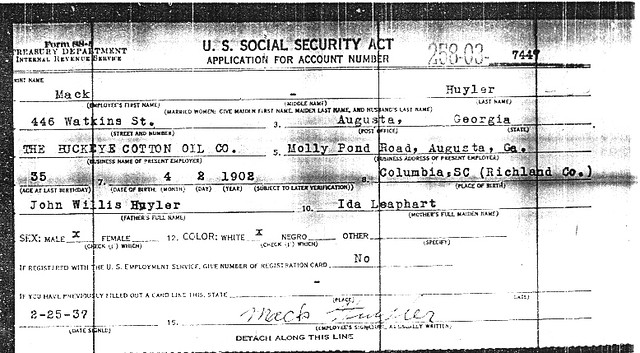
     Case Study: Here's my Great-Grandfather Vary "Mack" Huyler's social security application. In 1937 Mack was AWOL from his family, having left to "find work" and neglecting to return for 14 years. Before requesting this document, none of his descendants knew the names of his parents. From requesting this document, I was able to begin tracing the Huyler line back to the 1600s. This application provides a wealth of information about him: address, job, birth day, parents names, etc, that have really helped in my research.


mack huyler ssa

26 August 2011

When Did They Die?

     Need to know when an ancestor died? Just look up their death certificate, right? Unfortunately, that's often not an option. Government issued death certificates are, for the most part, a more recent concept which became standard practice at different times throughout the United States. For example, South Carolina, Georgia and Connecticut began to require death certificates as of 1915, 1919, and 1897 respectively.

     When a death certificate is not an option, where can you look for a date of death? Here are some suggestions, some of which might be obvious and others which may be new ideas.

  • City or County Records - In some cases, specific localities might have kept death certificates earlier than the state required.  Before you assume that there is no death certificate available, check the area where your ancestors lived (if known) to make sure that there is, in fact, no death certificate.
  • Tombstones - If you know where your ancestor is buried, you might be able to visit the cemetery to find your ancestor's date of death. If the original stone is damaged or otherwise illegible, try and find a previously published transcription.
  • Obituaries - Published in newspapers, obituaries can provide a wealth of information about your ancestor and their entire family. Depending on the era and location in which the obituary was published, the information included may vary. The appearance of an obituary might also be decided by your ancestor's social status. My favorite online source for newspapers in GenealogyBank.com, though I've also gone to many local libraries to look up obituaries on microfilm. 
  • Mortality Census - Along with the population census, a mortality census was taken in 1850-1880. This document records deaths for the 12 months leading up to the census. A few states, Colorado, Florida and Nebraska, took a mortality census in 1885.  These are available on ancestry.com (link)
  • Probate Records - If you don't have an estimated date of death, you might have to spend a lot of time browsing reels of microfilm for probate records. However, if you do find a will or estate record, you'll know that your ancestor died before it was recorded with the court.  If you're lucky, you might be able to find a date of death in testimony given by witnesses. 
  • Church Records - Depending on the type of religion your ancestor was affiliated with, records will vary. Some churches took detailed records, others none at all. My experience is with protestant churches, who seemed to make random membership lists. Check with the church themselves as well as the local historical societies and courthouses - there's no telling where the records might be. Also check with FamilySearch.com, who might have made microfilmed copies of the church's record.
  • Tax Records - Unlike census records, tax records weren't only created every ten years, but were often taken every year. Depending on the location, availability may vary, however they usually list land-owning heads of households (you might also find tax records for other purposes as well).  Try and find a series of years and look for when you ancestor disappears. Does his wife show up in the tax records the next year instead? This method isn't foolproof, but it can work in some situations. 

     Case Study: I had a particularly frustrating ancestor, William Britt, for whom I could not find a date of death. I could not find a local death record, tombstone, obituary, mortality census record, any probate records, or church for him. He was an old man when he appeared in the 1900 census, giving his age as 81 (though I suspect he was actually about 75). By 1910 his (third and much younger) wife, Permelia, was listed as a widow, so I knew that he had died by then. I had a ten year window, but I wasn't happy with it. His son, my great-grandfather, was born in 1901 and I wanted to see if William was still alive at this time. That's when I decided to check the tax records. Luckily, the records were available for his location, Emanuel County, GA, for a number of years between 1900 and 1910.  By checking the records I was able to see that William was listed in the 1902 records, but in 1903 his wife, Permelia, was listed instead.  From this, I now know that he died sometime in 1902 or 1903. I still don't have an exact date, but I have a much better idea than I did. And I know that he died after his youngest child was born. 


07 January 2011

A Few Pieces of Advice for Beginner Genealogists

     I often offer to help friends or co-workers start their own genealogy research. While doing this, I've noticed a few researching ticks that those new to genealogy tend to get hung up on.
  • You know more than you think you know.
    • Often, to get folks started, I ask if they know their grandparents or other relatives who would have been alive in 1930 and would have appeared on the 1930 census. I ask if they know any maiden names, great-grandparents names, the names of any siblings, and birth or death dates. Most folks claim not to know these more specific details. However, when I present them with a few options, they immediately pick one out because "that was her maiden name" or "that's his brother and sister!" It always turns out that everyone knows more than they thought they knew. 
      • Try and brainstorm everything you know about a particular ancestor. Think back on family events or stories the ancestor told and you might be surprised about what you know.
  • Not everything you know is true.
    • Although many people have a smattering of information on their ancestors, if this knowledge isn't backed up by documentation or previous research, it might not be true. Really, some of the information that you know, might actually be inferred or mis-remembered. Just because your grandfather lived his entire life in Kansas City, KS, doesn't mean he didn't die in Kansas City, MO.  Maybe you remember going to an ancestor's funeral when you were a small child - do you know 100% that you remember the correct funeral or location for the ancestor? It can be easy to confuse childhood memories.
      • Don't limit your research just because you know something is true. Be willing to research outside of the box.
  • SC PronunciationsJust because it's spelled that way, doesn't mean it might not be found spelled this way.
    • I know that your family spells their name McGuire doesn't mean that it won't be spelled Macguire on a record. Names were often spelled differently at different times, before standardized records became common. Your ancestor might have spoken with an accent and a clerk wrote down the name oddly. Or perhaps your ancestor changed the way their name was spelled - I know mine did! Could your ancestors even write their name? And this applies to more than just names. Any small details might be a little different than you know.
      • Don't overlook a record just because a small detail is different than you know it to be. Look at the rest of the record and see if other details add up to match your ancestor.
  • There's a lot of genealogy online, all over the internet.
    • Before getting started in genealogy, many folks don't realize how much information is readily available online, both for free and for a cost. And it's not just in one location - it's all over the internet. 
      • Make use of the large database websites, as well as state run or genealogical society sites.  Try Google or another search engine to find smaller sites.
  • Just because a database is online, doesn't mean it's a complete database.
    • Very often there will be a database online, such as Georgia Deaths, Texas Marriages, Ohio Births, etc. Databases such as these are goldmines for genealogists - but they may not be complete. You ancestor might have been born or died inside the timeframe for the database, but are nowhere to be found. But that might not mean the record doesn't exist. 
      • Check the details of the database to ensure that there aren't gaps in the database that would cause your ancestor to excluded. You might try locating the original records to see if you record can be found. 
  • It's not true just because it's on the internet or in a book.
    • There is a plethora of information out there, from written histories to online family trees. But before you blindly add this information to your own family tree... just don't! Do you know where this information comes from? What are the sources? Likely, there aren't any - so why would you believe the information?
      • Although the information might be true, you can't trust it blindly. Find the sources they used or use their information as a blueprint for your own research. You don't have to completely disregard the info, just don't blindly trust it.
  • Georgia RoomIt's not all online.
    • This is one that can't be stated enough. When getting started, there's so much genealogical information online, that newbies might get tunnel vision. With so much available, they might start thinking that if it's not online it's not available. So not true!
      • There is so much available in libraries or archives that has to be seen in person or might be available by research request. Don't ignore the real world records.
    Anyone else have any other tips for those new to genealogy?

27 June 2010

How I Use Ancestry.com's Member Trees

Often, when genealogists talk about online family trees, they do so with derision. They point out, and rightly so, that a lot of these family trees are full of miss-information that has simply been copied from somewhere else and lack sources. Many folks will simply ignore other family trees when doing their research, but I find this to be very shortsighted.

I've written before about the successes I've had with Ancestry.com's trees and finding photos. I also find that the online trees are a great way to find new sources for my ancestors. Many online trees might contain errors but might also contain links to documents on ancestry or uploaded photos and documents. By using the "shaky leaf" hints, researchers can easily add these items to their own family tree. At the same time, the prior complaints remain the same. Researchers should always use caution before adding any information to their trees, no matter how easy Ancestry.com had made it. There are ways to utilize the information and Ancestry's system without compromising the caliber of your own tree. Here's how I do it:

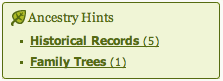
It all starts with the well advertised "shaking leaf." Although I've criticized the simplicity and, as I see it, misleading aspects, of this system, the leaves are still a good place to start. So, I click on the "Family Trees (1)" link, which will take me to my hints page. I will have to click on "Review Hints" for the families trees again to see the trees that Ancestry.com thinks match my own.
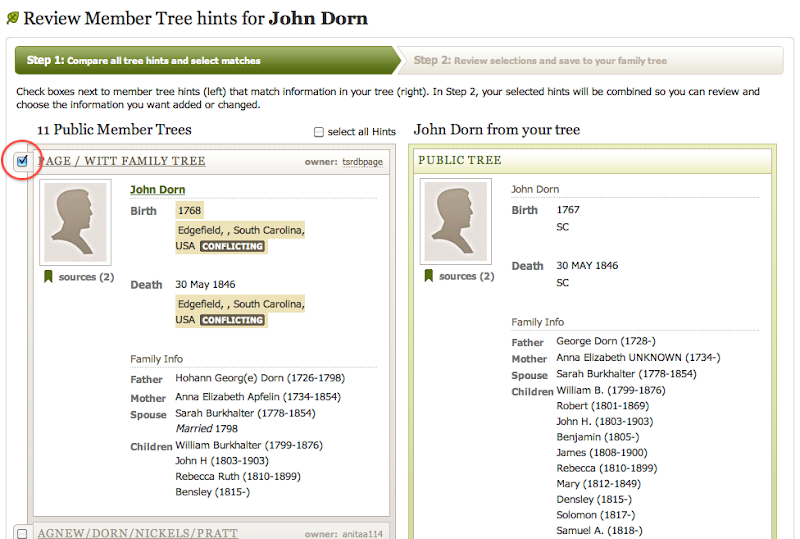
On this page, you'll see the individual from your tree on the right, with each suggested tree on the left. You can review each suggestion to decide if the individual matches your ancestor. If they do, click the checkbox next to the suggestion. This step doesn't change your tree, so don't worry about any "conflicting" highlights that you see. Once you have chosen all the suggestions that match your ancestor,  click the orange button to "review selected tree hints."


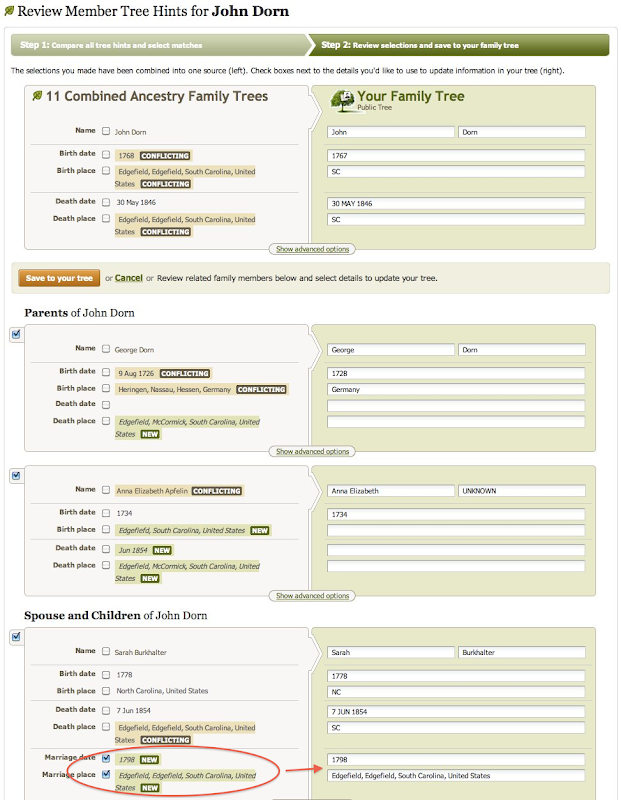
On this next page, you'll see a page where all of the information from those other trees has been combined and now wants to connect to your tree. Here's what it looks like:


There's a lot going on in the image above. The most important think to look out for if you want to protect the information in your tree is any information marked "NEW." This only happens when the suggested tree has fields filled in that your tree has empty. This information will automatically be checked and will be added to your tree if you don't do anything. See Sarah Burkhalter for example. With these boxes check, marriage information has been inserted into my tree on the right. However, if you look above Sarah to George and Ann, you can see that I have unchecked the "NEW" information and the field on my tree remain blank. The first thing that I do when looking at this page is to uncheck all "NEW" boxes. I don't want to blindly add this information to my tree. Where did it come from? What are the sources? I have no idea. You can also see that a number of fields are marked "CONFLICTING."  Because I already have information in these fields, I would have to manually mark the boxes to have this changed in my tree.

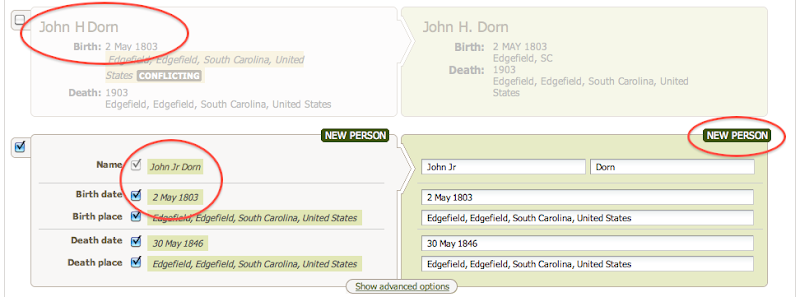
As I continue down the list of family members, I find a listing for two different Johns:


According to Ancestry.com's system, these are two different sons named John. One is already listed in my tree, while another is not and is marked "NEW." If I selected on the 2nd John's check box, he will be added to my tree as a brand new entry. But I have to be careful here, because these two John's are the same person. The have the same birthday and everything, but for some reason Ancestry wants to keep them separate. I never add new people from this view.

So if I'm not adding information from these trees, what's the point of making these connections? Like I said before, I find this system to be a good way to find new sources, document and photos for my family.  After connecting these trees to my own, I have gained five new hints for my tree. All of the records on their tree, have now been suggested for my own. Perhaps they've been able to find an elusive 1850 census record that I couldn't find because of a strange spelling. Perhaps they've uploaded a document that they received from a local archive. These records will now be suggested to me - and I haven't even visited their family tree.  Again, I cannot take these hints as gospel. I still need to review each hint and decide its validity on my own.

In less than five minutes, Ancestry has helped me collect the records from (in this example) 11 different family trees that reference my ancestors. Instead of having to review each tree individually, I can see their sources all at once. Of course, if these sources prove useful, I should review the tree that it came from, which might contain more information.

Genealogists should utilize all forums of research available to them. If they are cautious, there's a lot of great information to be found.

18 May 2010

How to Change Assigned Parents in Reunion

For me, a big part of genealogy research is finding false leads and having to correct data. This is especially annoying when that data has already been entered into my gedcom file. Here's a quick example on how to fix one of those errors using Reunion software for mac.

I'm currently breaking down my Albea family brick wall. It's a bit confusing right now, with the discovery that my ancestor, Thomas Albea, had two wives. So, I need to move some of the children around between spouses.  Using Reunion, I can do that rather easily - but it took me a while to figure this out so I thought I'd share it.

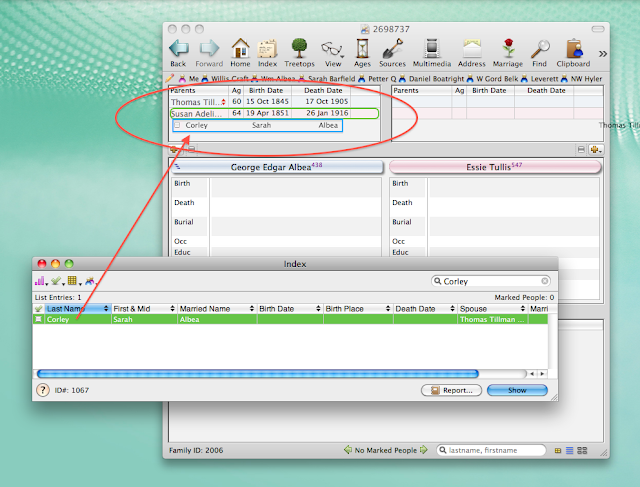
Here's what my initial family looked like:


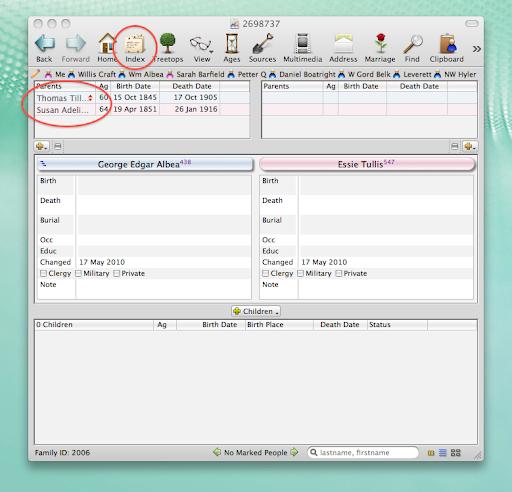
You can see that I have George Albea listed as the son of Thomas and Susan Albea. In fact, I believe him to be the son of Thomas and Sarah Albea. Because I already have George listed with his wife and have begun to add sources, I'd rather not have to delete the couple and start over. It's much simpler to change George's mother.  

To start with, I select the Index icon on the toolbar (I've arranged this icon to appear in this exact spot, so it may be in a different place on the toolbar for other Reunion users). When the Index box pops up, I typed in the surname for George's correct mother, which is Corley. In this case, Sarah Corley is the only result. Now, I simply click on Sarah's name and drag and release it over Susan's name, as shown below:


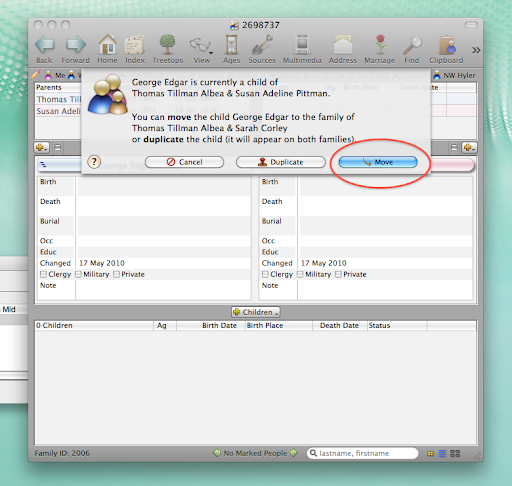
Now, my software will ask me to verify how exactly I'd like to add Sarah to George's record. In this case, I want to move George to the record for Thomas and Sarah. This way, I don't end up with mulitple listings for George or random, unattached individuals floating in my software. If I was unsure which woman was George's mother, I could duplicate George and have him appear as a child for both of Thomas' wives.


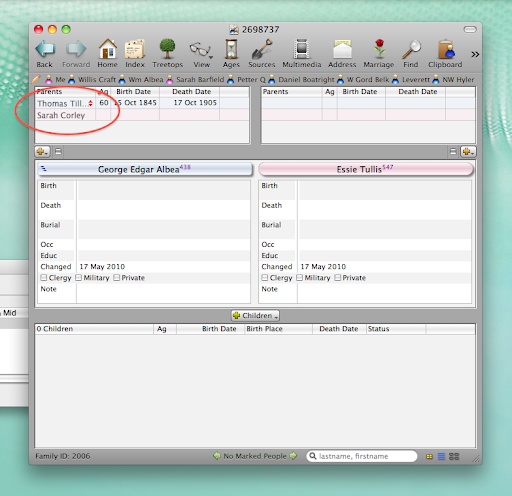
Now, you can see that George's parents are listed as Thomas and Sarah:


This method can be used for a number of other events in Reunion, such as adding a second marriage between duplicate spouses or creating links between two ancestors already listed in your tree.

12 April 2010

Recognizing Handwriting

     When viewing original documents, it's often handy to be able to identify who's handwriting the document was written in.  For example, the family Bible that I mentioned receiving on easter. The Bible was handed down from mother to daughter. If I were able to identify whose handwriting was whose, I would have a better idea of the accuracy of the record.

     I've decided to create a handwritting "key." I'm going to find handwritting examples of all of the relatives that I can. I will then be able to compare these samples to different documents.  Here are some samples I've already collected:

Mom:

Dad:

Granny:

Grandaddy:

Grandmama:

     As you can see, my sources come from many different places: lists, recipes, returned checks and checkbooks, greeting cards and letters, etc.  I'm trying to obtain at least two samples from each person, understanding that many people write differently depending on the formality of the documents and for other reasons. Also, I like to try and find a sample of each person's signature.  I hope that by collecting these samples now, I'll save myself time and a guessing game in the future.

20 January 2010

Image Oddities

I've been browsing through Ancestry.com's new City Directory listings (yes browsing only - the search doesn't seem to find folks half the time) and have found some image oddities. Check out the screenshot below:


See they gray spots and textured areas? It can make it just about impossible to read some of the images on this page. But what if you ancestors are on this page? Never fear intrepid researchers! Just click to save the image to your computer and...


The new image is perfect! I'm not sure what's causing the error in the original image, but this is an easy way to get around the problem.

14 November 2009

Surfing Google Wave

So, I received an invite to Google Wave. I'm very curious to see what can be done in Genealogy with Google Wave. Well, I'm still not 100% sure how this might affect Genealogy, but I do know that it's pretty confusing to start with. I've been exploring for a little over an hour.

Although there are a number of "introduction to Google Wave" waves that newbies are automatically added to, I still had a lot of questions. So, I googled Google Wave. Here are a few helpful things I've learned so far:
  • To find a wave, type "with:public" and your search term. For example, "with:public Genealogy" will find the genealogy waves.
  • When you create a wave, add 'easypublic@appspot.com' to the wave. Google recommends adding 'public@a.gwave.com,' but I couldn't get that to work.
  • Waves show up in your "inbox" just like email messages. When there's a new post, a number is added next to the wave's title. You'll have to click on every post (AKA blip) in a wave to get this number to go away, or click "read" at the top of the wave. Easily navigate each blip in a wave by utilizing your up and down arrow keys.
  • You can expand a wave to take up the whole screen by hitting the maximize button on the top right of the wave's box.
  • Also, you can click the minimize button to send the entire box up to the top of the screen onto a toolbar like area. It'll work like a pull-down menu now.
  • You can add maps, photos and gadgets to blips. Start a new blip and then utilize the options on the toolbar that appears.
These are just a few things that I've noticed so far. I'm sure there are a lot of other features that I've yet to discover.

LinkWithin

Related Posts with Thumbnails